create-arsh-electron: a 2026 Electron scaffold
September 29, 2026 · Tech
If you're picking an Electron scaffold in 2026, here's ours: create-arsh-electron is now on npm, and npm create arsh-electron@latest gets you an Electron 42 + Vite 8 + React 19 + TypeScript 6 + Tailwind CSS 4 project — frameless window, a small desktop UI kit, a vitest baseline and GitHub Actions CI included. The four build pitfalls we documented in our create-electron-vite series (TS6133, binary download failures, bloated asar, ghost files) are simply the factory-default state here. Measured end to end on Windows: 0.5s to scaffold, 35.2s to a signed-ready Windows installer, app.asar at 0.26 MB.
This closes out a three-part series: part one covered the official scaffold and wiring in AI coding tools, part two fixed its four build pitfalls by hand, and this one bakes those fixes into a scaffold of our own, proven end to end with a real project.
The short version:
- Two prompts (project name, git init or not); name / productName / appId / author are all derived for you
- All four build pitfalls fixed out of the box: app.asar drops from 4.9 MB to 0.26 MB
- Ships with a frameless window, 8 UI primitives, a vitest baseline, GitHub Actions CI, and an AGENTS.md bootstrap that interviews you in the first AI session
- Electron 42 behavior change: the runtime binary downloads on first run, not at
npm install
Getting started: one command, two prompts
npm create arsh-electron@latest <project-name>
Requires Node ≥ 20.11. The CLI asks exactly two things: the project name (skip it by passing the name as an argument) and whether to initialize git with a first commit. Everything else is derived: the package name and author (pulled from your git config), the installer's productName (arsh-demo → ArshDemo), the appId (com.arshdelight.arshdemo by default — pass --scope mycompany to get com.mycompany.arshdemo), the window title and the title-bar brand. The YourAppID / YourAppName placeholders you had to hunt down with the official scaffold simply don't exist here.
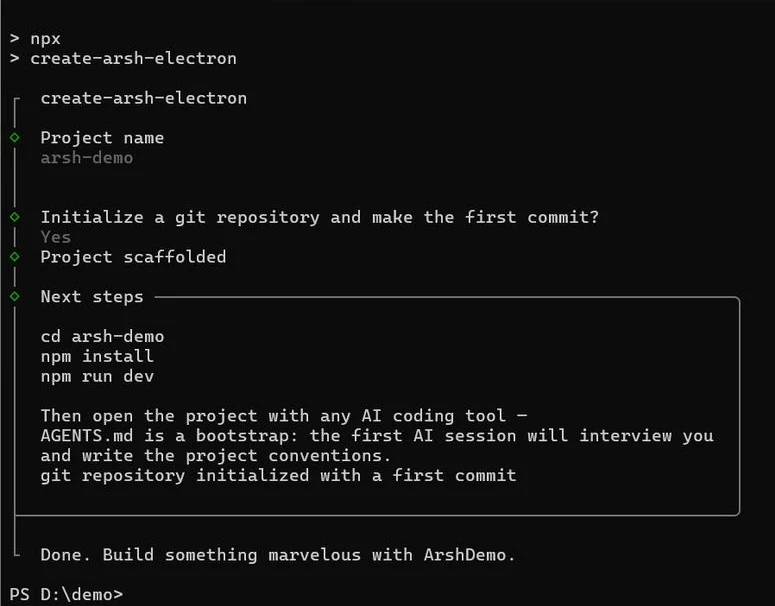
Figure: the complete npm create arsh-electron flow — two questions, then the next steps, ready to paste
The generated layout:
├── electron/            # main process + preload
├── src/                 # renderer (React + Tailwind 4)
│   ├── ui/              # 8 UI primitives (Button/Dialog/TitleBar…)
│   └── lib/utils.test.ts    # vitest baseline
├── .github/workflows/ci.yml  # lint + typecheck + test on push/PR
├── AGENTS.md            # bootstrap for AI sessions (see below)
├── electron-builder.json5   # packaging config (appId, NSIS, mirror)
└── vite.config.ts
Next steps are the usual three: cd in, npm install, npm run dev. A --yes flag skips all prompts (git init included) for scripted use. The scaffold itself — template copy, renames, git init, first commit — takes 0.5 seconds.
The four Electron + Vite + React build pitfalls, fixed by default
Part two ended with a six-step manual fix list for create-electron-vite. Here's what those same pitfalls look like in create-arsh-electron:
| Pitfall from part two | create-electron-vite 0.7.1 | create-arsh-electron 0.2.0 |
|---|---|---|
TS6133: dead require declaration | Every variant fails its first build | No dead code in the template — first build is green |
| Binary download failures | Flaky GitHub direct connection | Mirrors preconfigured in both electron-builder.json5 and .npmrc — zero manual steps |
| Bloated asar | 4.9 MB on the React template | 0.26 MB (dependencies stays empty) |
| Ghost files | Nobody cleans dist-electron/ | Build script wipes outputs first — exactly 2 files in our test |
| .gitignore gaps | CRLF patch silently fails | Complete .gitignore + automatic git init + first commit |
| Placeholder metadata | YourAppID / YourAppName | appId, productName and author all derived |
The asar fix deserves a word. dependencies stays an empty object in the template, and every renderer dependency lives in devDependencies — Vite compiles them into dist/ anyway, so all that lands in the asar is your own code. The rule of thumb from part two ("if the app still runs without it, it's a devDependency") is also written into AGENTS.md, so a future npm install xxx doesn't quietly drag node_modules back into the package.
The test baseline follows the same "prevent regressions" logic: the template ships a vitest suite for its cn() utility (3 assertions covering conditional class joining and tailwind-merge conflict resolution), and CI runs lint + typecheck + test on every push and PR. The tests aren't there to prove the template correct — they're a first example of the density you want when your own business code lands.
A desktop UI, included
npm run dev opens a frameless window (frame: false) with a hand-rolled title bar: brand text on the left, minimize / maximize / close on the right, double-click to toggle maximize, an optional always-on-top pin, and drag regions already wired up. On the plain web (no preload bridge) the controls degrade gracefully to a plain bar. If you build internal tools or client work, this is a layer you'd otherwise rewrite every time.

Figure: the starter page — frameless window, custom title bar, and a single count button demonstrating hot reload
On top of that sit 8 primitives: AppLayout, TitleBar, NavItem, Button, Dialog, Tooltip, Spinner, Switch, themed with CSS variables + Tailwind CSS 4. Re-skin by editing variables; delete src/ui/ entirely if you'd rather not have it — packaging doesn't care.
The first lesson lives in AGENTS.md
Part one ended with advice: after scaffolding, have your AI set up the version-control baseline first. That step is now built in — git init and the first commit happen at scaffold time, so every AI edit is diffable and revertable from commit one.
AGENTS.md itself is intentionally opinion-light. Commit style, collaboration preferences, definition of done — those belong to each team, and a scaffold deciding them for you is overreach. So the file is a bootstrap: in your first AI session it runs a short interview (5 questions, one round, "default" skips), then rewrites itself with your answers. Three hard rules survive every rewrite, because the template's structure makes them non-negotiable:
- Dependency partition:
dependenciesholds main-process runtime packages only, in sync with theexternallist invite.config.ts; - The renderer never touches Node/Electron APIs: all IPC goes through
window.ipcRenderer, with new channels registered in three places (handler → preload → type declarations); - Definition of done:
npm run lint(zero warnings),npx tsc --noEmit, andnpm testmust all pass.
Electron 42: the binary now downloads on first run
npm install finished in 7.5 seconds (warm cache) — yet node_modules/electron/dist didn't exist. Only at the first npm run dev did we see Downloading Electron binary..., fetching the runtime on the spot.
Electron 42's package no longer ships an install script: npm install doesn't download the binary at all. Instead index.js self-heals when required — if dist is missing, it runs the download right then. Compared with the electron 30 era described in part two (download at install time), the timing has moved to first run.
Mirror configuration splits in two:
- The renderer side's @electron/get reads mirrors only from environment variables (
npm_config_electron_mirror/ELECTRON_MIRROR). npm 11 still forwardselectron_mirrorfrom project.npmrcinto script environments (verified working), but warns "Unknown project config" on every npm command and will stop forwarding in the next major; - The packaging side is unaffected — electron-builder reads
electronDownload.mirrorfrom its own json5 config, no environment variables involved.
If your CI assumes "install, then build offline", note that from electron 42 on you need an explicit download step after install (run electron once to let it self-heal, or execute its install.js directly).
Numbers and versions
Environment: Windows 11, Node v24.15.0, npm 11.12.1, create-arsh-electron 0.2.0. Project arsh-demo, built with zero code changes:
| Step | Measured |
|---|---|
| Scaffold (incl. git init + first commit) | 0.5 s |
| npm install (warm cache) | 7.5 s |
| npm run dev (vite ready) | 0.7 s |
| npm test | 3/3 passing |
| First-run binary self-heal | under 1 minute |
| npm run build, end to end | 35.2 s |
| app.asar | 0.26 MB |
| Installer ArshDemo-Windows-0.1.0-Setup.exe | 97.7 MB |
| win-unpacked | 358 MB |
Stack: Electron 42.11.8, Vite 8.3.1, React 19.3, TypeScript 6.0, Tailwind CSS 4.3, vitest 4.1, electron-builder 26.15.3. The scaffold package itself is 78.2 kB across 38 files.
Two known nits: no app icon yet (build logs default Electron icon is used — drop a ≥256×256 build/icon.png to clear it), and npm 11's unknown-config warning (see above; we'll revisit when the mirror handoff settles).
Wrapping up
The series comes full circle: pitfalls (part one), fixes (part two), and now the fixes baked into a scaffold. Whether you're comparing scaffolds or project templates for an Electron desktop app in 2026, start here — MIT licensed, one command away: npm create arsh-electron@latest.
Planning an Electron desktop app, or stuck on build issues? Talk to us.
Related posts
Tech
create-electron-vite quickstart, with AI coding
One npm create command sets up an Electron + Vite + TypeScript project. Covers the scaffold's four out-of-the-box pitfalls and wiring in AI agents.
Tech
Four create-electron-vite build issues and fixes
Fresh create-electron-vite builds fail: TS6133, download stalls, bloated asar, ghost files. Root causes and one fix list — measured 282.8→34.7 MB.
Was this article helpful?
Questions, corrections, or your own take. We read every piece of feedback.