One Command to a B2B WordPress Starter Site
October 13, 2026 · Products
Building WordPress sites for export businesses, the hard part was never the pages. It was the identical setup ritual at the start of every project: install a dozen plugins, close the attack surfaces one by one, strip the admin of menus and promo banners your client will never need, and rebuild the header and footer yet again. After a few projects it became obvious that this ritual is itself a product. So we distilled it into arsh-wordpress-starter, an internal starter template repository. Starting a new site now means cloning the repo and running one script, bin/setup.sh. From an empty Docker environment to a bare-bones site ready for page work, nobody has to click through the admin even once.
The short version:
- It is a template repository: a hand-rolled theme (~1,400 lines, no parent theme) + three mu-plugins + ten base plugins, on a one-command Docker Compose stack;
bin/setup.shis idempotent: it installs the core, the plugins, the pages and the inquiry form, and re-running it never touches your customizations;- The admin is reshaped for the client: default dashboard widgets and third-party promo banners are gone, the sidebar keeps just six everyday menus;
- Security defaults ship enabled: a private login route with rate limiting, XML-RPC off, all three username-enumeration paths blocked;
- It is an internal delivery tool, not for sale, but every WordPress project we build starts from it.
What it is: a template repo, not a site builder plugin
arsh-wordpress-starter is a Git template repository with three parts. Part one is our own arsh-starter theme, about 1,400 lines with no parent theme: a sticky header, a mobile drawer menu, a two-column footer (copyright left, navigation right), and base templates for pages, posts, archives and 404. Every design token lives in the CSS :root, so re-skinning a client project means editing variables in one place.
Part two is a trio of mu-plugins (197 lines total) that reshape the dashboard, the admin menu, and the security baseline — more on those below. Part three is the plugin list and the setup script that pins down which ten plugins every new site gets and how they are configured.
The local stack is a Docker Compose file with four services: WordPress (PHP 8.3), MySQL 8.4, phpMyAdmin and WP-CLI. It ships with the repo, so no project assembles its own containers anymore.
Just as important is what it is not: not a premium site-builder plugin, not a page builder, not a SaaS. Clients don't get the power to drag a website into existence; they get a sound skeleton, and we build industry-specific pages on top. Here is what a freshly seeded site looks like — four base pages, navigation menus and the inquiry form, all in place:
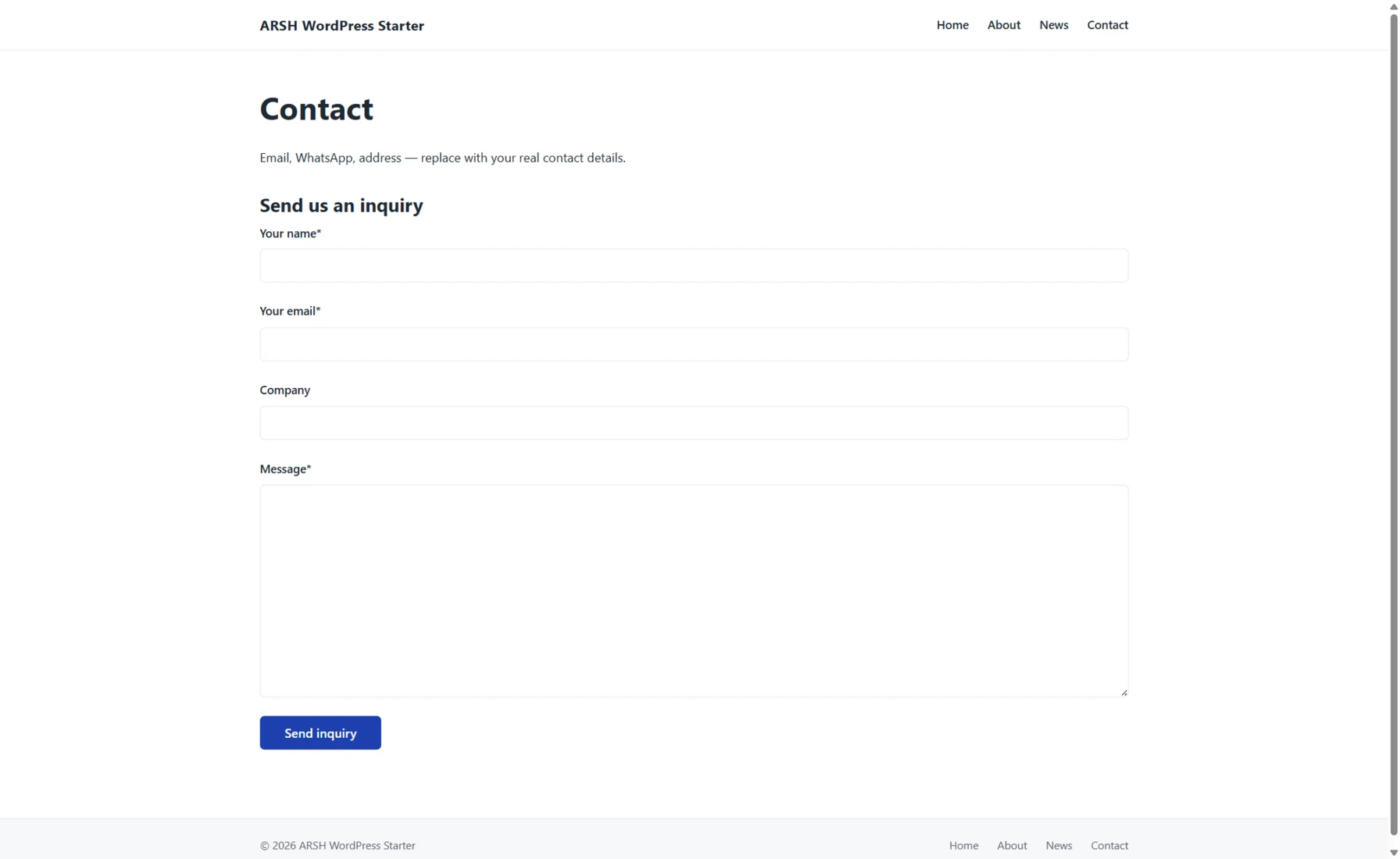
Figure: the starter's Contact page right after seeding. The inquiry form is wired in; copy and contact details stay as placeholders until the project replaces them.
What happens inside that one script
Setup is two commands, cp .env.example .env and bin/setup.sh. The script runs seven steps in order:
- Start the containers and wait for the database health check;
- Install WordPress core (site language en_US, a Chinese language pack for the admin);
- Activate the house theme;
- Pre-install and activate the ten base plugins;
- Apply defaults: classic editor locked in, comments and pingbacks closed, page cache on;
- Seed the initial content: Home, About, News and Contact pages, a main menu and a footer menu, a CF7 inquiry form wired into the Contact page, plus one deletable placeholder post;
- Write
.htaccessmanually and set permalinks to post name, so pretty URLs work immediately.
Step six deserves a note. The inquiry is the core conversion path of a B2B export site, so the form is not left for the client to install. The seeder builds a generic inquiry form (name, email, company, message) with a mail template ready, and embeds it into Contact. The form sends from the site's own domain and puts the visitor's address in Reply-To, so both intake and replies flow. The inquiry pipeline works from minute one; only the fields need adjusting per industry.
Idempotence is the property that matters most. Every step checks before it acts: pages are deduplicated by slug, forms by title, menus by name. If you stopped halfway, changed settings, or the client has been using the site for a while, re-running the script overwrites nothing. That makes it both a setup tool and a recovery tool.
Ten base plugins covering inquiry, SEO, security and speed
The plugin list comes in two tiers. The ten base plugins ship with the script, chosen by one standard: free, no upsell nags, able to run for years without babysitting.
| Plugin | What it does |
|---|---|
| Contact Form 7 | The inquiry form, the core conversion path of a B2B site |
| Flamingo | Stores inquiries in the database — nothing lost if email breaks |
| FluentSMTP | Sends via SMTP/API instead of default mail(), with a delivery log |
| SEOPress | Sitemap, meta and schema, lightweight with no upsell |
| Limit Login Attempts Reloaded | Login rate limiting against password brute force |
| WPS Hide Login | Moves the login route to a private address |
| WP Super Cache | Page cache (swapped for LiteSpeed Cache on LiteSpeed hosts) |
| Classic Editor | Clients write posts only; the classic editor protects page structure |
| Site Kit by Google | GA4, Search Console and PageSpeed in one official dashboard |
| Converter for Media | WebP/AVIF conversion, self-hosted and unmetered |
A few picks deserve explanation. Inquiry data must stay in our own database, so CF7 pairs with Flamingo and nothing is lost when a mail server acts up. Mail must go through an API or SMTP, because WordPress's default PHP mail() lands in spam folders on most foreign servers. Locking in the classic editor is a counterintuitive but deliberate call: page structure is maintained on the dev side while clients write news, and the classic editor removes the chance of accidentally wiping a page layout.
The optional tier follows the business: GTranslate for machine-translation fallback, Polylang when a key market justifies professionally maintained translations; Chaty for a WhatsApp floating button; WooCommerce only when there is a product catalog, never on pure inquiry sites. And overlapping security plugins must not stack — adopting Solid Security means replacing the two login-hardening plugins wholesale.
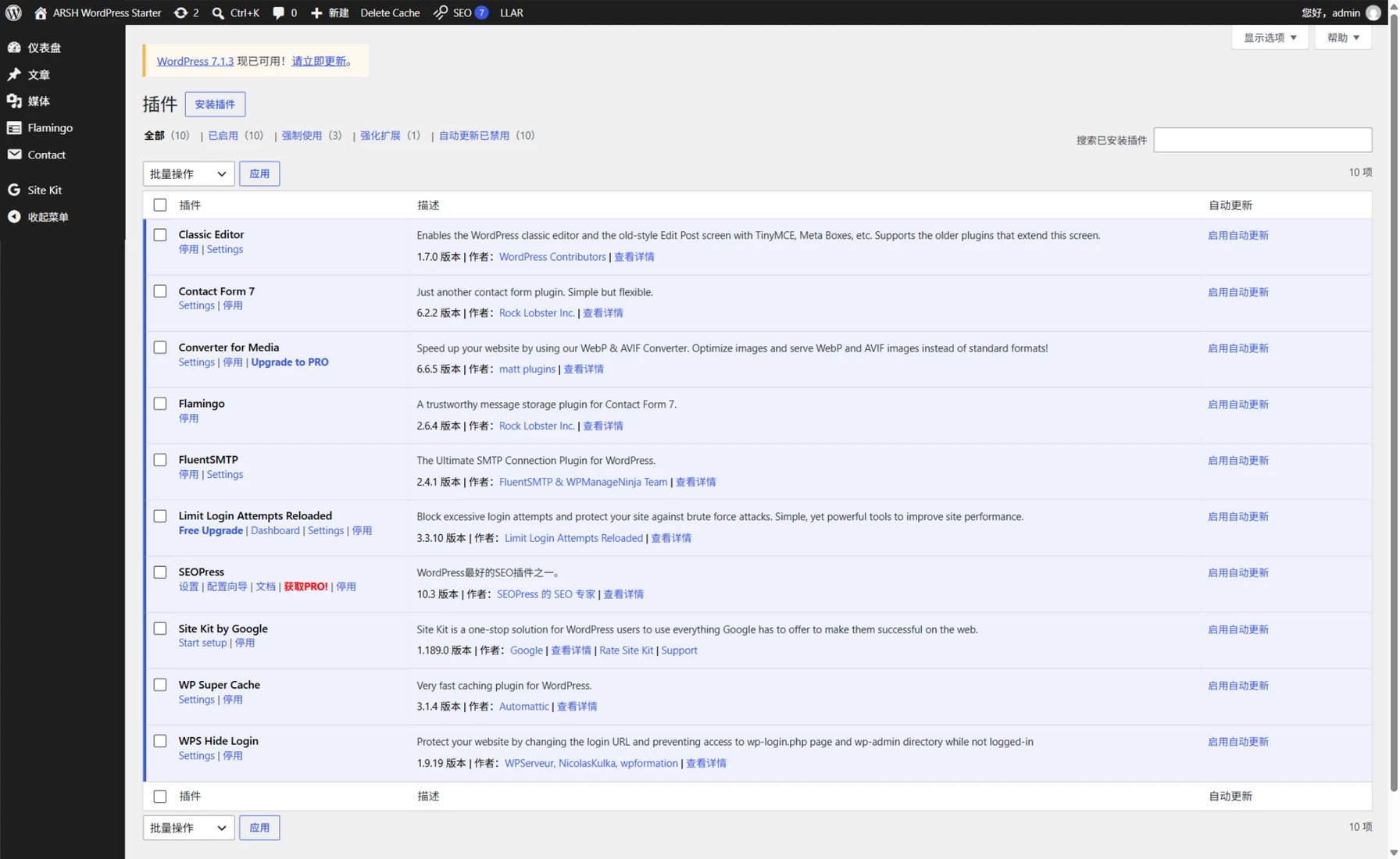
Figure: the plugins screen of a fresh site. All ten base plugins are active, versions tracking the official WordPress directory.
The admin, filtered through the client's eyes
This layer is the three mu-plugins, and choosing mu-plugins over a regular plugin is itself part of the design: must-use plugins have no "Deactivate" button, so clients cannot break them, and they never clutter the plugins list.
A cleared dashboard. WordPress ships five dashboard widgets — At a Glance, Activity, Quick Draft, Site Health and Events — plus a welcome panel, all of it noise for a client who visits to publish news and check inquiries. All removed. Third-party promo banners ("Thanks for installing", "Leave a review", "Upgrade to Pro") are a second kind of noise; they are stripped before rendering. Critical core notices — updates, maintenance, recovery mode — pass through a whitelist untouched, and functional widgets from plugins (say, the failed-login chart) survive as well. The SMTP stats widget is pinned near the top so the client's first glance answers "are inquiry emails going out?"
A slimmer sidebar. The menu is reordered around the client's day: dashboard, posts, media, Flamingo (the inquiry inbox), Contact (forms) and Site Kit (traffic) — six items, top to bottom. Appearance, plugins, users, tools, settings, comments, pages, SEO settings and login hardening are all hidden: nine top-level entries plus the Updates sub-menu. Hidden is not disabled; direct URLs still work, and our maintenance runs through WP-CLI anyway.
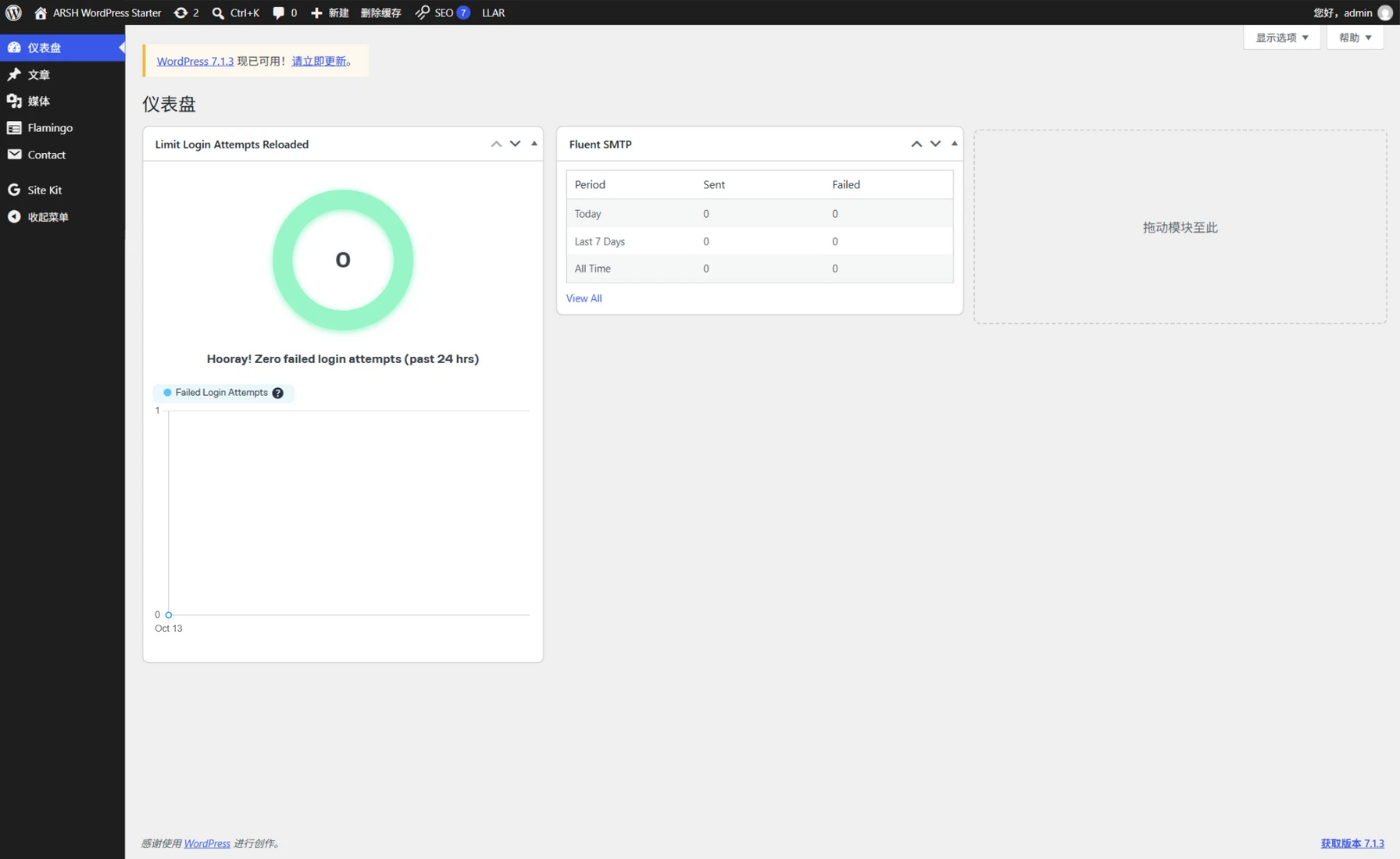
Figure: the dashboard after the cleanup. Default widgets and promo banners are gone, leaving the login-limit chart and the SMTP stats; note the core update banner still shows — it comes through the whitelist.
The bar is simple. A client's admin exists for three things: reading inquiries, writing posts, checking traffic. Anything outside those three gets hidden or blocked.
Security defaults that skip the usual attack surface
When a WordPress site gets compromised, the attack almost always lands on a hole the default install leaves open. This starter turns hole-plugging into factory configuration — active the moment a site is created, never dependent on someone remembering. We walked through the attack mechanics in WordPress Brute Force: Close Both Doors; the difference here is that those manual moves now happen automatically on every new site.
The login layer is handled by two plugins: the route moves to a private address with wp-login.php retired, and login attempts get rate-limited so password dictionaries stall. The mu-plugin covers four more fronts. XML-RPC is switched off entirely, its method table emptied and its discovery links removed, leaving scanners nothing to probe. The head and feeds stop advertising the WordPress version number, so an outdated core is not a targeting beacon. Username enumeration is blocked on all three paths: ?author=N probes and author archives redirect home, and the REST users endpoint returns 404 to logged-out visitors, so there is no first username to harvest. Finally, comments and pingbacks close site-wide — a B2B export site has no comment use case, and shutting the master valve leaves robots nowhere to dump spam.
None of this is exotic, and each piece is easy to do once. What the starter buys is that none of it depends on memory: the hundredth site ships with the same posture as the first.
From starter to a live client site
A new project runs five steps: clone the repo and re-init git; globally replace the theme directory name, text domain and container names with the client's slug; set the port, admin password and site title in .env; run bin/setup.sh; then pick business plugins from the optional tier and start building industry pages. The repo also carries a go-live checklist — rotate every local default password, close debug switches, confirm the cache, take the first backup — to walk through at deployment.
Page sections are deliberately not pre-built. A fresh site holds placeholder copy, because sections are where industries differ: a machinery factory's homepage should not look like a food exporter's. The repo keeps a checklist of common B2B export sections, from trust bars and product matrices to FAQs, and each project picks, prunes and builds them into templates. The list runs on one principle: a section must serve trust or conversion, and if it serves neither, it doesn't ship.
Wrapping up
arsh-wordpress-starter manages the floor: every WordPress project we build starts from the same security posture, the same clean admin, the same repeatable delivery path — none of it resting on memory or feel. The ceiling belongs to each project, in the page sections, fields and styles that grow on top of this skeleton. It is an internal tool, not publicly distributed, but every WordPress client site we ship starts here.
Related posts
Was this article helpful?
Questions, corrections, or your own take. We read every piece of feedback.